
Canon PGI-1500 Ink Guide: MAXIFY Printers, Standard vs XL & Best Value
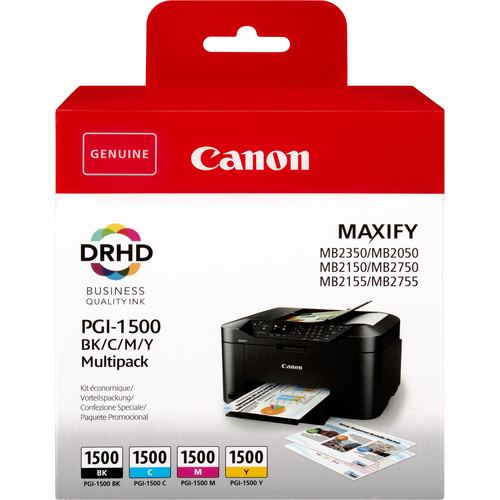
Canon MAXIFY printers are a favourite in small offices and home offices – and they all run on Canon PGI-1500 ink. Here’s which cartridge you need, the difference between standard and XL, and how to get the best value.
Which printers use Canon PGI-1500 ink?
- Canon MAXIFY MB2050
- Canon MAXIFY MB2150
- Canon MAXIFY MB2155
- Canon MAXIFY MB2350
- Canon MAXIFY MB2750
- Canon MAXIFY MB2755
Check the model name on the front of your printer. If it’s not on this list, contact us and we’ll find the right ink.
Standard or XL – which should I buy?
The PGI-1500 comes in two sizes that fit the same printers:
- PGI-1500 (standard) – lower price per cartridge. Good if you print occasionally.
- PGI-1500XL (high yield) – holds much more ink, so it prints far more pages and works out cheaper per page. The better choice for most businesses.
You can mix sizes – for example an XL black with standard colours.
Prices
| Cartridge | Standard | XL (high yield) |
|---|---|---|
| Black | PGI-1500BK – £11.62 | PGI-1500XL BK – £20.25 |
| Cyan | PGI-1500C – £7.55 | PGI-1500XL C – £12.56 |
| Magenta | PGI-1500M – £7.55 | PGI-1500XL M – £12.56 |
| Yellow | PGI-1500Y – £7.55 | PGI-1500XL Y – £12.56 |
| Multipack (4 colours) | PGI-1500 Multipack – £32.53 | PGI-1500XL Multipack – £51.06 |
Original Canon cartridges. Prices ex VAT at the time of writing – see each product page for today’s price.
Our tip: if you replace all four colours at once, the multipack is cheaper than buying single cartridges. If one colour runs out much faster than the others (usually black), buy that colour on its own in XL.
Why MAXIFY printers use pigment ink
All PGI-1500 cartridges, including the colours, use pigment ink rather than dye ink. Pigment ink dries fast and resists smudging and highlighter pens, which makes it ideal for invoices, letters and reports. It also stays sharp on plain office paper.
Tips to save ink on a Canon MAXIFY
- Leave the printer on standby rather than switching it off at the wall – each cold start runs a cleaning cycle that uses ink.
- Use “Draft” or “Economy” mode for internal documents.
- Print a page each week if the printer isn’t used much – it stops the print head drying out.
- Replace only the empty colour. Each colour is a separate cartridge.
Frequently asked questions
Are PGI-1500 and PGI-1500XL interchangeable?
Yes. Both sizes fit every printer listed above, and you can mix them.
My printer says the cartridge isn’t recognised – what should I do?
Remove the cartridge, check the protective tape and orange cap are fully removed, then push it firmly into place until it clicks. If it still isn’t recognised, contact us – faulty goods are collected free of charge and replacements are dispatched the same day (see our returns policy).
Can I recycle empty Canon cartridges?
Yes – we work with Print Recycle, who recycle 100% of each cartridge. See toner recycling.
Order Canon PGI-1500 ink from 4th Dimension IT
We supply businesses, schools and home offices from Sheffield across the UK. Order online or call 01142 991 889.
Buying regularly for your business? Open a business account and ask us about account pricing.
